Skip to content

Game Mechanics

Credits, maps and joining

Every account has credits. New accounts start with 1000 credits (until the beta is over). Creating a map and validating it (so that other players can join) costs the map owner 100 credits. Joining someone else’s map costs 10 credits, charged when the owner approves your request. The owner can approve or deny each join request (shown on the bottom right of the screen).

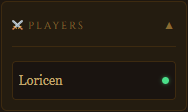
  • The players list shows who is online (green dot) and who has finished their turn (✓).
  • The sidebar chat lets you talk to the other players of the map.
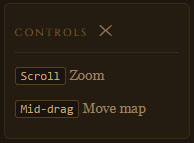
  • Zoom with the mouse wheel; move by dragging with the middle or right mouse button, or with the directional pad at the bottom right of the map (the centre button recentres the view).
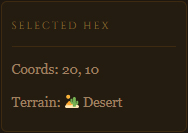
  • Click any tile to see its coordinates and terrain in the Selected Hex panel.
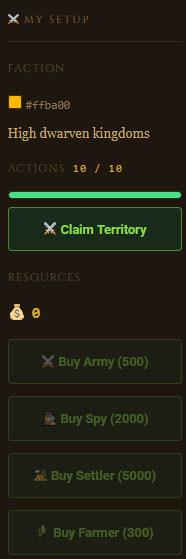
  • The right panel shows your faction, actions left, resources and the purchase buttons; selecting one of your units shows its name (editable), strength and available actions.
Setting up your faction

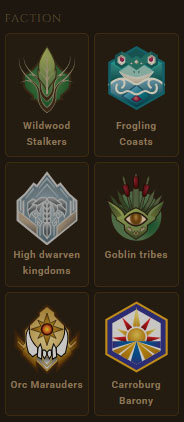
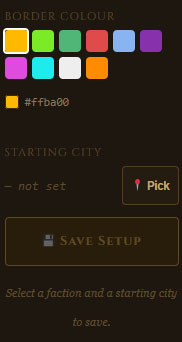
Once a map is validated, every player chooses a faction, a border color and a starting city on the map. You can change these choices as long as the game has not started. The terrain panel in the sidebar shows the percentage of each terrain type on the map (water included) to help you pick a good spot.

Other players’ starting cities and borders are hidden from you until the game starts.
Each faction icon shows a counter with the number of players who have already chosen that faction.

Your starting city must be on land and on a tile that gives your faction its bonus terrain (see Factions and resource bonuses): the Confirm button stays disabled, with an explanation, on any other tile, and the server refuses an invalid choice.
Changing your faction clears your starting city, so you need to pick a new one for the new faction.
When choosing a location, a pop-in warns you if an enemy city is within 10 tiles of it.

When every player has chosen a starting city, a message tells you the game is waiting for the others, then a 1-minute countdown begins. Any player changing their setup resets the countdown to the full minute. When it ends, the game starts automatically. If some players never choose a city, the map owner can force the start after 24 hours: players without a city are automatically resigned.

Each turn, every player has 10 actions. Claiming a tile, moving an army, buying a unit, founding a city or a farm and merging armies each cost 1 action. Press End Turn when you are done; the ✓ mark next to your name in the players list shows who has finished. A new turn begins when all players have ended theirs, or automatically 16 hours after the turn started. At the start of a new turn, actions are refilled and income is paid.

Every new turn you receive:

50 + (10 × owned tiles) − army upkeep − spy upkeep + faction bonus

  • Army upkeep: each army costs power ÷ 1.5 if its power is 500 or less, its full power if it is between 501 and 4000, and double its power above 4000.
  • Spy upkeep: if you own at least one spy, you pay 200 + (20 × number of spies) per turn.
  • Your resources cannot go below zero.
  • A bonus tile on or next to one of your cities produces ×1.5.
  • A farm built on a bonus tile produces ×2. Both multipliers stack, 
  • A farm bonus tile next to a city yields 15 instead of 5.

Each faction earns +5 resources per owned tile of its favourite terrain:

FactionBonus tile
Wildwood StalkersForest
Frogling CoastsAny tile next to water
High dwarven kingdomsMountain
Goblin tribesSwamp
Orc MaraudersDesert
Carroburg BaronyPlains


Use Claim Territory to take an unclaimed tile that touches one of your borders (1 action). Water can’t be claimed. Armies also expand your borders: when an army moves, it claims the tiles around it, as long as they are not water and not protected by an enemy army (an enemy army protects its own tile and the six around it). This also works on enemy territory.

Spies, settlers and farmers never expand borders.

You can claim enemy tiles if the whole area it belongs to is completely surrounded by your territory (water counts as a wall), has no city in it and does not reach the edge of the map. The entire enclosed area, enemy and unclaimed tiles alike, is annexed with a single action.

Farms inside the area are not annexed; they must be attacked.
If the area contains a city, encirclement does not work at all: the claim is refused and nothing is annexed; the city must be attacked.

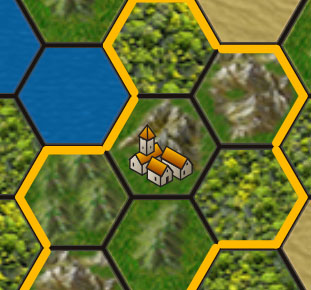
Your starting city is your first building. A city is where you can buy units and upgrade armies, and it provides vision (see Fog of war). A city has a defence strength of 1500 in combat. You can found more cities with settlers.

Farms are the second kind of building (see Units). When attacked, a farm only defends with 100 strength.

Units are bought on one of your cities, on a tile not occupied by another unit, and cost 1 action.

Unit

Cost

Role

Army

500

Fights and conquers territory.
Starts with a random strength between 400 and 500.

Spy

2000

Reveals the fog and spots enemy units within 7 tiles.
No combat strength.

Settler

5000

Founds a new city.
No combat strength.

Farmer

300

Builds a farm.
No combat strength.

All units move one tile per action (on land; water can only be crossed by ship, see Ships and sailing) and can be renamed.

Upgrading an army: while an army stands on one of your cities, spend resources to increase its strength: 10 resources = 1 strength point. A slider lets you choose the amount.

Merging armies: moving an army onto a friendly army asks for confirmation, then combines both strengths into one army (1 action).

  • Settler → city: move the settler to a tile that gives your faction its bonus terrain, with no other building on it, then press Found City. The settler is consumed and the new city works like your starting city.
  • Farmer → farm: move the farmer to one of your own bonus tiles with no building on it, then press Build Farm. The farmer is consumed. The farm doubles that tile’s resource output, but it is not a city: you cannot buy units there and it gives no vision.
  • Build buttons: Found City and Build Farm are only enabled when the selected unit can really build where it stands: it needs at least one action left, the tile must give your faction its terrain bonus and hold no building, and for a farm the tile must also be yours.
    Nothing can be built on water: a unit at sea must land first.

Any unit can now take to the sea:

  • Boarding: a unit standing on one of your cities can move onto an adjacent water tile (1 action).
    It cannot board from a farm or from any other land tile.
  • At sea: a unit on water is displayed as a ship.
    It moves one water tile per action and can keep sailing from water to water.
  • Landing: from the water, a ship can land on any adjacent land tile whenever that move is possible, using the normal move rules (combat, captured tiles, and so on).
  • No conquest at sea: a unit that moves onto a water tile never claims territory, so sailing along a coast captures nothing.
    Only landing does.
  • Fights at sea: moving onto a water tile that holds an enemy unit starts a normal fight (see Combat).
  • Vision: a ship reveals the fog of war within 3 tiles (a spy at sea keeps its range of 7).
    Fogged terrain is only drawn within 5 tiles of a ship, instead of the usual 10.

Moving an army onto a tile with an enemy army and/or an enemy building starts a fight, resolved in a single roll:

  • Attacker: army strength + a random roll from 1 to 100.
  • Defender: garrison army strength + building strength (1500 for a city, 100 for a farm; added together if both are present) + a random roll from 1 to 150.

The higher total wins (the attacker wins ties). The winner keeps an army whose strength is the difference between the two totals (at least 1). If the attacker wins, the defending army and the building are destroyed and the attacker takes the tile. If the defender wins, the attacking army is destroyed and the garrison, if any, keeps the remaining strength. Units without combat strength lose almost every fight, so keep them away from the front line.

The result of each battle is announced in a pop-up with a battle sound.

Once the game has started, the map is hidden except around what you control:

  • Your territory and cities reveal everything within 5 tiles.
  • Your spies reveal everything within 7 tiles.
  • Your ships (any of your units at sea) reveal everything within 3 tiles.
  • Everything else is dark: enemy borders, cities and units are not displayed there.


Enemy units
(armies, settlers and farmers) are visible as soon as they stand on a tile outside the fog of war. Enemy spies stay hidden unless they are within 7 tiles of one of your spies. You can only select an enemy unit, to see its faction and its strength, when it is within 7 tiles of one of your spies; without a spy nearby you can see it but not click it. Your own units are always visible.

A player who has no city and no unit left is eliminated automatically and loses their territory. Any player can also Resign at any time, giving up their territory, units and buildings. The game ends as soon as only one player remains, and that player is the winner.

This page is where a map owner builds a map before opening it to players. Its sidebar only lists your maps that are still in the Setup stage.

Building the map

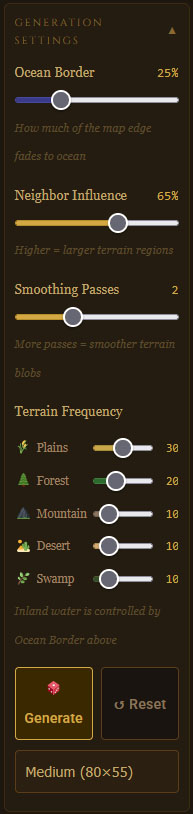
A random map is generated when the page opens.

Choose the map size, adjust the generation settings and regenerate until the layout suits you.

Each tile is one of six terrains: plains, forest, mountain, desert, swamp or water.

Select a terrain in the sidebar and click tiles to repaint them by hand.

You can also generate a map from an image, load a map file, or download your map as a file.

Save the map to the server under a name of your choice. Once saved it gets a unique map ID that you can copy and share, and it stays editable while it is in the Setup stage.

When the map is ready, press Validate Map.
This costs the owner 100 credits (new accounts start with 10 credits).
Validating locks the map: it can no longer be edited and it moves to the Ongoing stage, so it now appears on the Current games page and players can request to join it.

As the owner approve or deny the join requests of other players, and you take part in the setup like everyone else by choosing your own faction and starting city. If some players never pick a starting city, you can force the game to start after 24 hours.

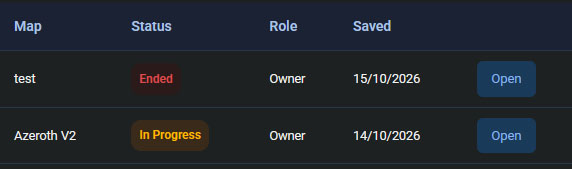
This page lists every map on the server in a table, so you can find a game to follow or join.

ColumnMeaning
MapThe name of the map
StatusSetup : the owner has not validated the map yet.
Awaiting : validated, players are choosing their faction and starting city.
In progress : the game is running.
Ended : the game is over.
RoleOwner if you created the map.
Player if you are part of it.
Empty if you are not a member of the game.
CreatedThe date the map was created.

The Open button takes you to the Current games page with that map already loaded. If you are not a member of the map yet, you will be offered to request to join it there (10 credits, charged when the owner approves).